
SARS Auto Assessment 2026: What It Is, How to Check & What to Do
SARS auto-assesses millions of South African taxpayers every year. Here is exactly what it means, how to check if it is correct, and what to do if it is wrong.
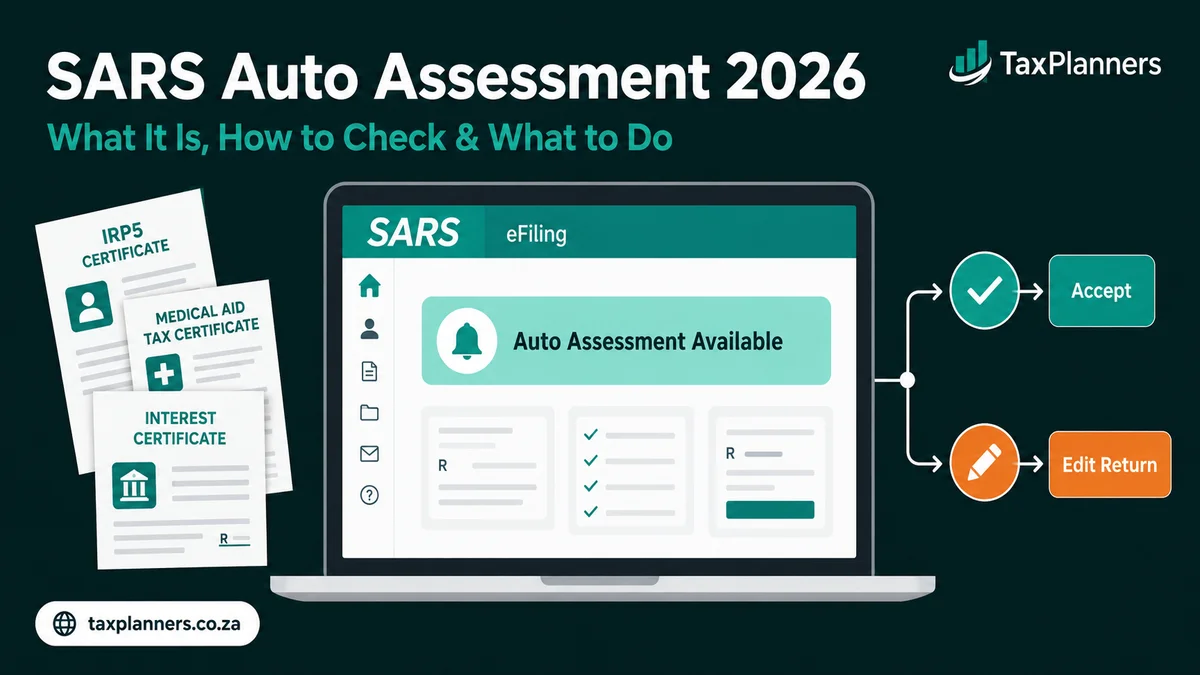
A SARS auto assessment is when SARS automatically files your ITR12 tax return on your behalf using third-party data from your employer (IRP5), medical aid fund, retirement annuity administrator, and bank. SARS notifies you by SMS or email. You then have a set window to either accept the auto assessment or edit and resubmit your own return if anything is incorrect or missing.
What is a SARS Auto Assessment?
A SARS auto assessment is an automatic tax return that SARS files on your behalf using data it has already received from third parties. SARS collects this information from your employer, medical aid fund, retirement annuity administrator, and banks — then calculates your tax liability and issues a provisional assessment without you having to do anything first.
SARS introduced auto assessments in 2020 to simplify the filing process for taxpayers with straightforward tax affairs. By 2026, the majority of South African individual taxpayers receive an auto assessment at the start of each filing season.
The key point: a SARS auto assessment is not final until you accept it or the filing deadline passes. You always have the right to review it, correct it, and resubmit your own return if the auto assessment is incomplete or wrong.
Who Gets a SARS Auto Assessment?
SARS selects taxpayers for auto assessment based on the simplicity of their tax affairs. If SARS has all the data it needs to calculate your tax accurately from third-party sources, you are likely to receive one.
- Have only one employer and one IRP5 certificate for the year
- Have medical aid contributions reported to SARS by your medical scheme
- Have retirement annuity contributions reported by your RA administrator
- Have bank interest income reported by your bank (IT3b certificate)
- Have no additional income sources such as rental, freelance, or foreign income
- Have no complex deductions such as a home office or travel allowance logbook
- Have no capital gains to declare from shares or property sales
How the SARS Auto Assessment Process Works
Understanding the SARS auto assessment process from start to finish helps you know exactly what to expect and when to act.
SARS receives data from your employer (IRP5/IT3a), medical aid scheme, retirement annuity administrator, banks (interest certificates/IT3b), and other financial institutions — typically by May or June each year before filing season opens.
Using this third-party data, SARS applies the 2025/2026 tax brackets, rebates, and medical aid tax credits to calculate your provisional tax liability or refund amount — without any input from you.
SARS sends an SMS and/or email notification confirming that your SARS auto assessment is ready to view. The notification includes a link to eFiling and states the deadline by which you must accept or edit your return.
Log into eFiling or the SARS MobiApp to view your auto assessment in full. Review every line carefully — compare every figure to your IRP5, medical aid tax certificate, RA certificate, and bank interest certificate.
If the auto assessment is correct and complete — accept it. If anything is wrong, missing, or you have additional income or deductions to declare — click Edit Return and file your own ITR12 with the correct information and supporting documents.
If your assessment shows a refund, SARS will pay it to your verified bank account — normally within 21 business days after the assessment is finalised. If you owe tax, pay via eFiling before the deadline to avoid interest and penalties.
Accept or Edit Your SARS Auto Assessment — What Should You Do?
This is the most important decision you make after receiving a SARS auto assessment. Use this framework to decide:
| Your Situation | Action | Reason |
|---|---|---|
| One employer, no extra income, all certificates correct | ✓ Accept | Auto assessment is likely accurate |
| Rental income not included | ✎ Edit & resubmit | Rental income must be declared — SARS does not have this data |
| Freelance or commission income missing | ✎ Edit & resubmit | All income must be declared — omitting it risks an additional assessment |
| Medical aid contributions or member count wrong | ✎ Edit & resubmit | Incorrect medical tax credit leads to wrong tax — under or overpayment |
| RA deduction missing or incorrect amount | ✎ Edit & resubmit | RA deduction reduces taxable income — do not miss it |
| Travel allowance with logbook to claim | ✎ Edit & resubmit | Auto assessment cannot include logbook km — must be manually entered |
| Home office deduction to claim | ✎ Edit & resubmit | Must be calculated and added manually with supporting documentation |
| Capital gains from shares or property to declare | ✎ Edit & resubmit | CGT must be declared manually — SARS does not calculate this for you |
| Worked for two or more employers during the year | ✎ Edit & resubmit | Verify both IRP5s appear — SARS sometimes misses one |
Step-by-Step: How to Check Your SARS Auto Assessment on eFiling
Go to www.sarsefiling.co.za and log in with your username and password. If you do not yet have an eFiling account, register using your South African ID number and tax reference number before filing season opens.
Click Returns → Income Tax → ITR12 → Select the relevant tax year (2025/2026). You will see a notification that your auto assessment is ready, along with an option to View, Accept, or Edit.
Click View to open your SARS auto assessment in full. Check the income section, all deductions, your medical aid tax credits, and the final tax calculation. Compare each line to your IRP5, medical aid tax certificate, RA certificate, and bank interest statement.
The assessment shows either a refund amount or a balance due. Use our income tax calculator to independently verify whether the figure is correct before you accept or edit.
If correct — click Accept. If incorrect — click Edit Return, make all necessary changes, add any missing income or deductions, attach supporting documents where required, and click Submit to file your own return.
After accepting or editing, SARS will send a confirmation via eFiling and by SMS or email. Save your confirmation number and download the final assessment document (ITA34) from eFiling for your records.
Common SARS Auto Assessment Errors to Check
A SARS auto assessment is only as accurate as the third-party data SARS received. These are the most frequent errors found in auto assessments — always check for each one before accepting.
If your medical scheme reported incorrect contribution amounts or an incorrect number of members to SARS, your medical tax credit will be wrong — affecting your tax by hundreds or thousands of rands. Always compare to your medical aid tax certificate.
If your RA administrator did not report your contributions to SARS in time, your retirement annuity deduction may be absent entirely — resulting in higher taxable income and more tax than you actually owe. Check against your RA certificate.
Employer errors on the IRP5 — wrong salary figures, incorrect PAYE deducted, or missing allowances — flow directly into your auto assessment. If your IRP5 is wrong, contact your employer immediately to resubmit the corrected version to SARS.
SARS only includes data it has received. Rental income, freelance income, foreign income, and commission income are not automatically included. If you have any of these, you must add them manually by editing your return before submitting.
Banks report interest income to SARS via IT3b certificates, but the figures sometimes differ from your actual bank statement. Always verify the interest amount shown in your auto assessment against your bank’s own tax certificate for the year.
If you changed jobs during the tax year, both IRP5 certificates must appear in your return. SARS sometimes misses the second employer. Always count the number of IRP5s in your auto assessment and compare to how many employers you had.
2026 SARS Auto Assessment Deadlines
SARS typically opens the auto assessment season in July each year. Mark these 2026 dates in your calendar — missing the deadline means your auto assessment becomes final even if it is incorrect.
| Event | Typical Date | Notes |
|---|---|---|
| Auto assessments issued | July 2026 | SARS sends SMS and email notification |
| Filing season opens (eFiling) | July 2026 | You can begin accepting or editing from this date |
| Deadline — non-provisional taxpayers | October 2026 | Must accept or edit your return by this date |
| Deadline — provisional taxpayers | January 2027 | Extended deadline for provisional taxpayers |
| Refund payment | Within 21 business days | After assessment is finalised and banking details verified |
SARS Auto Assessment Refunds — What to Expect
If your SARS auto assessment shows a refund, SARS will pay it to your verified bank account — typically within 21 business days of the assessment being finalised. There are several things that can delay or reduce your refund.
SARS will only pay refunds to a verified bank account in your own name. Update and verify your banking details on eFiling before accepting your auto assessment to avoid delays.
If you have any outstanding SARS debt from a previous tax year, your refund will be applied against it before any remaining balance is paid to you. Check your account for outstanding items.
SARS may select your return for verification before releasing a refund — even for auto assessments. Submit all requested supporting documents promptly via eFiling to avoid further delays.
If your auto assessment missed a deduction — such as an RA contribution or additional medical expense — editing your return before accepting may significantly increase your refund amount.
Use our SARS tax refund calculator to estimate your refund and verify whether the auto assessment result matches. If your refund is lower than expected, read our guide on why you may not have received a SARS refund.
💵 Check Your Expected Refund →SARS Auto Assessment vs Manual ITR12 Filing
| Feature | SARS Auto Assessment | Manual ITR12 Filing |
|---|---|---|
| Who files | SARS — using third-party data | You — on eFiling |
| Income sources included | IRP5, medical aid, RA, bank interest only | All income sources you declare |
| Additional deductions | Not included automatically | Travel, home office, donations, all deductions |
| Accuracy | Depends on third-party data quality | You control accuracy |
| Effort required | Low — review and accept | Higher — must complete all fields |
| Best suited for | Simple tax affairs, one employer, no extras | Complex affairs — rental, freelance, CGT |
| Can be corrected after deadline? | Only via Request for Correction (RFC) | Yes — Request for Correction on eFiling |
For more detail on submitting your own return, see our complete guide on how to file your SARS tax return on eFiling. For the full 2026/2027 income tax picture, read our South Africa tax brackets guide.
Not Sure If Your Auto Assessment Is Correct?
Use our free South African tax calculators to verify your SARS result before you accept.
📈 Income Tax Calculator 💵 Refund Calculator 💼 PAYE Calculator